Choose the right surface
Use a smooth, sealed, painted surface. Check the MagPlay surface guide before installing.
High demand right now 💛 Your order may be dispatched 1–3 days later than usual.

A little setup. A world of play.
From the first peel to the final press: follow the guide for your MagPlay decal, then assemble your MagPlay Board if you have one.

Use a smooth, sealed, painted surface. Check the MagPlay surface guide before installing.
Remove dust with a dry cloth and avoid detergent or humid rooms. Allow at least 72 hours after washing the surface.
Wait at least 30 days after painting before applying your MagPlay decal.
MagPlay decal on a wall
A second pair of hands helps you position the arch. Choose a height your child can comfortably reach.
Wipe away dust with a dry cloth. The surface must be completely dry and free from detergent residue before you begin.
Start at one upper corner. Peel back a small section of the backing and line up your MagPlay decal. Gradually remove the remaining backing while smoothing the MagPlay decal onto the surface.
Work from the centre towards the edges with your hand, a card or a book to move trapped air outwards. Firm pressure activates the adhesive. Press the edges thoroughly.
MagPlay decal on MagPlay Board
Assemble the MagPlay Board first, then apply your MagPlay decal to its front.
Follow the assembly in the video, then use the three illustrated steps below.
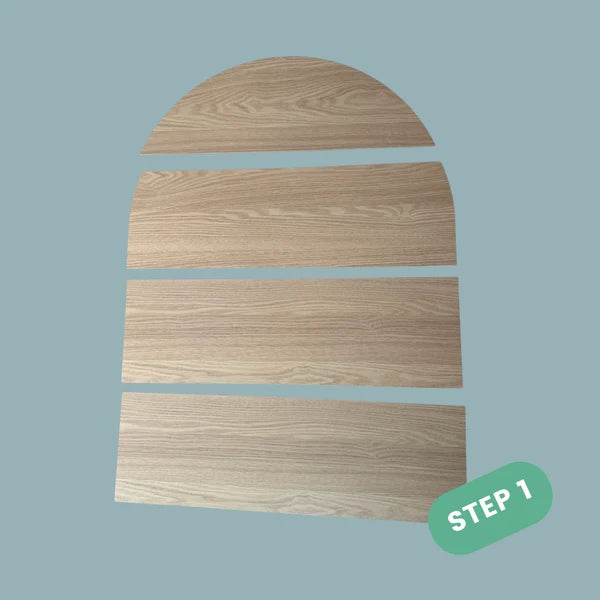
Lay the MagPlay Board panels on a flat floor or table and fit them together in the shape of the arch.

Turn to the back. Remove the protective backing from the adhesive on the wooden support strips and press each strip firmly into position, leaving small gaps between the strips. These supports hold the panels together.

Turn the assembled MagPlay Board over and dust the front with a dry cloth. Apply your MagPlay decal using the same gradual peel, smooth and press method described above.
The MagPlay Board assembles without tools. For wall mounting, use suitable heavy-duty picture hanging strips, such as 3M™ Heavy-Duty Frame Strips, following their surface and weight instructions. A compatible stand is another option.
Low temperatures can make the adhesive firmer. Warm the affected edge gently with a hair dryer on low for 1–2 minutes, keeping a little distance, then press and smooth it down firmly. Avoid high heat.
For a later move, peel your MagPlay decal slowly from an upper corner, return it to its backing and store it flat in its packaging. WallKind™ is designed for careful removal, but adhesion on a different surface can vary.
For your MagPlay decal, hands and a card or book for smoothing are enough. The MagPlay Board panels and self-adhesive support strips assemble without screws or nails.
Ease the bubbles towards the closest edge using your hand or a soft cloth. Small bubbles can settle as the adhesive bonds.
Use the gentle low-heat method above and press firmly. If needed, use the supplied extra adhesive at the upper and lower corners, remembering that these pieces may leave slight marks.
Check that the surface is compatible, dust-free and dry, and the room is not humid. If it still does not adhere, send us a photo of the surface and the issue so we can help.
Unsure about your surface or a step in the guide? Send us a photo and we will help you get started.
More questions? Visit our FAQ